glimpsel deco app
glimpsel is a simple desktop decoration app for the Windows OS. That means you could load any of the usual image formats to display on the desktop. It was coded in VB.NET. The language was mostly chosen for the use case of the application, that is that it was chosen to manage the windows quite literally. I did not know then what I know now, that both C# and VB.NET are essentially equivalent (apart from their syntax) as they were both developed by the same language development team at Microsoft.
In a way, I had personal reasons in picking up Visual Basic at least once. My late grandmother from my mother's side had once bought me a Visual Basic development kit, bundled with a lot of CDs and manuals. As I was never able to fully understand programming until much later, it became one of the deciding factors for going ahead with the choice for this application. I also had a good friend who helped me with the initial setup of the development.
It runs without any need for an installation, but it does add an ini file in the same directory of the application. Initially it was an application I made one night in August of 2010 as I could not find any application as practically simple online (or at all really).
 What users first see when they start glimpsel.
About 11 years later I picked up the source code again and added a lot of features and customizable options that allow the application to shine as a decoration app. Initially this was to allow multiple instances, an Always on Top feature, and the ability to send the instance(s) to the background. But it later evolved to also be an app that stays out of the way (in alt+tab) and easily restores a last saved state, among other things. More information about these developments can be gleaned from the 'About glimpsel' dialogue within the app.
To use glimpsel the user drags and drops image files directly to load them for displaying the images on the desktop background (animated GIFs work too!). Transparency however is not 100% as the application is not on a layered window. The right-click context menu gives plenty of options and the user may nudge the image with the arrow keys as long as the Ctrl key is held.
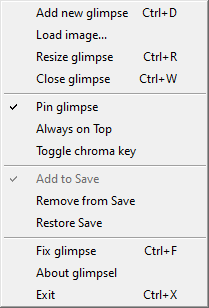 The options under the right-click context menu and their shortcuts.
The following code is a snippet showing the code to resize a 'glimpse', the name given to a single decoration window. It is a proud moment in my programming as I had to spend time away from the computer when I was stuck to write out the logic before coming back to code it in and have it work in one attempt. The syntax highlighting is not optimal but the comments help denote what is happening in the code.
Private Sub ResizeGlimpseMenuItem_Click(sender As Object, e As EventArgs) Handles ResizeGlimpseMenuItem.Click
    If resizeLarger Then
        ' Enlarge until resizeVal = 1
        If resizeValue > 1 Then
            PictureBox1.Size = New Size(PictureBox1.Image.Width / 2 ^ resizeValue, PictureBox1.Image.Height / 2 ^ resizeValue)
            Size = New Size(PictureBox1.Image.Width / 2 ^ resizeValue, PictureBox1.Image.Height / 2 ^ resizeValue)
            resizeValue -= 1
        ElseIf resizeValue = 1 Then
            ' No exponential value of resizeValue
            PictureBox1.Size = New Size(PictureBox1.Image.Width / resizeValue, PictureBox1.Image.Height / resizeValue)
            Size = New Size(PictureBox1.Image.Width / resizeValue, PictureBox1.Image.Height / resizeValue)
            resizeLarger = False
        End If
    Else
        ' Check if it's too small before diminishing
        If PictureBox1.Size.Width <= 10 Or PictureBox1.Size.Height <= 10 Then
            ' Enlarge and set mode
            resizeValue -= 1
            PictureBox1.Size = New Size(PictureBox1.Image.Width / 2 ^ resizeValue, PictureBox1.Image.Height / 2 ^ resizeValue)
            Size = New Size(PictureBox1.Image.Width / 2 ^ resizeValue, PictureBox1.Image.Height / 2 ^ resizeValue)
            resizeLarger = True
        Else
            ' Diminish image
            PictureBox1.Size = New Size(PictureBox1.Image.Width / 2 ^ resizeValue, PictureBox1.Image.Height / 2 ^ resizeValue)
            Size = New Size(PictureBox1.Image.Width / 2 ^ resizeValue, PictureBox1.Image.Height / 2 ^ resizeValue)
            resizeValue += 1
        End If
    End If
End Sub